
According to string-theory advocates, our universe has at least 10 dimensions. But we humans can only directly perceive three spatial dimensions. We also experience the passage of time, a fourth dimension. Beyond that, we only know other dimensions are even possible through theoretical mathematics. Our universe may hold secrets that we will never be able to observe directly.
Even if you discount string theory and the idea of dimensions beyond our perception, our world contains a wealth of information that most of us aren’t aware of in our daily lives. When visiting a city for the first time, for example, we may only have our senses to rely on when gathering information. A smartphone or computer can help out, pulling in more data about the city’s geography, history, economics, cuisine and other cultural features.
Augmented-reality applications overlay a level of digital information on top of the physical world around us. With an one of these apps on your smartphone, you might be able to hold your phone’s camera up to capture the image of a city street and then receive on-screen information about your surroundings.
While these augmented reality apps can be informative and entertaining, the form factor is still a little clunky. We have to hold up the smartphone and look at the screen — it’s like you’re on a “Star Trek” away team, and you’re the one with your eyes glued to a tricorder instead of drinking in the sights.
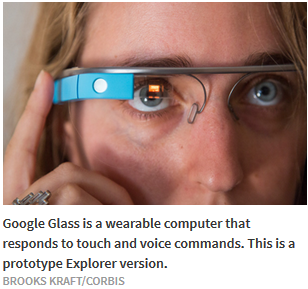
Google is one of several companies creating a solution to the problem comes in the form of a wearable device. It looks like a pair of glasses with one side of the frames thicker than the other. It’s called Google Glass, and it might open your eyes to a new digital world — or make you look like the nerdy Terminator who’s always picked last for robo-dodgeball.
The Birth of Google Glass
One of Google‘s many divisions is called Google X. Descriptions from visitors make it sound like it’s equal parts computer lab and mad scientist’s lair [source: Miller and Bilton]. Projects at Google X tackle big problems in engineering. Everything from networked homes to space elevators gets a shot within the lab. One of the many projects the division worked on is Project Glass.
Back in April 2012, a Project Glass account appeared on Google’s social networking platform Google Plus. The account’s first post revealed the purpose of the project — to build a wearable computer that helps you “explore and share your world” [source: Google Glass]. The post included a concept video of what the project — a pair of glasses — might be able to do in the future.
In other posts and articles, Google released more details about the glasses. Some versions had no lenses. What all versions did have was a thick area of the frame over the right eye. This is where Google put the screen for the glasses. To look at the screen, you have to glance up with your eyes. The placement was important — putting the screen in your direct line of vision could result in some serious safety problems.
It wasn’t long after Google released the concept video that people got a chance to see a pair of the glasses in real life. Google co-founders Sergey Brin and Larry Page wore the high-tech specs to events in late spring of 2012. And at the Google I/O event on June 27, 2012, Google gave attendees a thrilling demonstration of the technology.
The Google I/O took place inside the Moscone Center in San Francisco, but the first part of the demonstration was outside the building. To be more specific, it was a few thousand feet above the building. Google had outfitted a skydiving team riding in a blimp with Google Glass, and had set up a Hangout — a video chat on the Google Plus platform — with the team. Footage from the Glass cameras caught all the action. The team jumped from the blimp and maneuvered so that they landed on the roof of the Moscone Center.
The demonstration didn’t end there. Expert bicyclists, also wearing Glass, did tricks on top of the Moscone Center’s roof until they reached the edge of the building. Then, a man wearing Glass rappelled down the side of the building and handed off a package to another biker. That biker weaved through the conference center to get to the stage and hand the package off to Sergey Brin.
The audience watched the whole thing happen on a giant screen as footage from the various glasses played out in front of them [source: Google Developers]. Afterward, members from the Google X team in charge of the project talked about the philosophy behind the eyewear. Brin then returned to the stage to announce that Google planned to ship a developer pair of the glasses called the Explorer Edition in early 2013 for $1,500. That’s still the cost of the Explorer glasses, but it may not be the final price for Google Glass once it hits the general consumer market.
What Google Glass Does?
Upon launch of the Explorers beta program, Google Glass owners could use their specs’ specs to:
- Remind the wearer of appointments and calendar events.
- Alert the wearer to social networking activity or text messages.
- Give turn-by-turn directions.
- Alert the wearer to travel options like public transportation.
- Give updates on local weather and traffic.
- Take and share photos and video.
- Send messages or activate apps via voice command.
- Perform Google searches.
- Participate in video chats on Google Plus.
As of the publication of this article in early 2014, Glass can’t overlay digital information on top of physical locations. But imagine looking at a building and seeing the names of the businesses inside it or glancing at a restaurant and being able to take a peek at the menu. With the right application, you could apply dozens of filters to provide different types of information.
For example, let’s say you’re in London, sporting your snazzy Glass glasses. You take a look at the new Globe Theatre and ask for more information. You’re given choices — do you want to learn about the history of the original Globe Theatre? Would you like to learn about the new version that opened in the 1990s? Or maybe you just want to see what productions are currently running on the stage this season. Google Glass could potentially provide you all of that information.
Looking even further into the future, you might be able to use Google Glass to help you keep track of the people in your life or learn more about the people you meet. With facial recognition software and social networking, it’s possible you could take a look at someone you’ve just met and see their public profiles on any number of social platforms. (If that sounds potentially creepy to you, you’re not alone – we’ll talk about the criticisms of this feature in a bit.)
Google Glass is tightly packed with chips, sensors and feedback devices. Let’s take a look under the hood — or, rather, behind the lens.
What makes Google Glass work?
If you were to take apart a Glass, two things would likely happen: You’d discover the components that make the glasses work and you’d feel a deep sense of regret for ripping apart a $1,500 gadget. Fortunately, other people have already done this on your behalf.
There are a few different ways to control Google Glass. One is by using the capacitive touch pad along the right side of the glasses. The touchpad responds to changes in capacitance, which is essentially a weak electrostatic field generated across the screen. When your finger makes contact with the panel, a controller chip detects the resulting change in electric capacitance and registers it as a touch. Swiping your finger horizontally allows you to navigate menus on the device. Swiping downward on the touchpad backs you out of a choice or, if you’re at a top-level menu, puts the glasses in sleep mode.
Another way to control Google Glass is through voice commands. A microphone on the glasses picks up your voice and the microprocessor interprets the commands. You can’t just say anything and expect Google Glass to respond — there’s a set list of commands that you can use, and nearly all of them start with “OK, Glass,” which alerts your glasses that a command will soon follow. For example, “OK, Glass, take a picture” will send a command to the microprocessor to snap a photo of whatever you’re looking at.
As of early 2014, the processor in the Explorer version of Google Glass is from Texas Instruments. It’s an Open Multimedia Applications Platform chip (OMAP). These chips belong to a larger classification of microchips called systems on chip. That means there are multiple components working together — in this case, an ARM-based microprocessor, video processors and a memory interface. According to Texas Instruments’ specifications, the chip is capable of playing video at 1080p resolution and 30 frames per second.
The main circuit board also houses a SanDisk flash drive for memory — 16 gigabytes’ worth of storage, though only 12 gigabytes are available to the user. A company called Micron Memory (formerly known as Elpida) supplied the dynamic random access memory (DRAM) chip. These chips provide not only storage for media and apps, but also the memory that the microchip requires to run programs on the Glass.
While you can use Google Glass to take photos and videos without having it connect to the outside world, to get the most from the product you’ll need to connect to the Internet. The two ways to do that are over Bluetooth (connecting to some other device, such as a smartphone) or WiFi. A single chip inside Google Glass provides support for either type of connection. Another chip, the SirFstarIV, is a global positioning system (GPS) microchip that allows Google Glass to determine its location via satellite signals [source: Torborg and Simpson].
Source: HowStuffWorks.com | By Jonathan Strickland | http://electronics.howstuffworks.com/gadgets/other-gadgets/project-glass.htm
Micro Tech Resources | 26250 Industrial Blvd, Hayward, CA 94545 | 510.531.3582

